
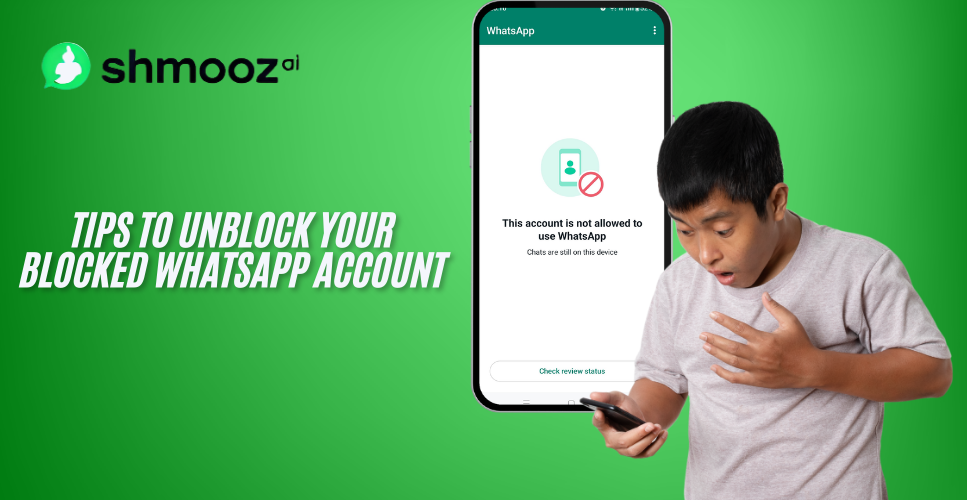
WhatsApp blocked my number — how to unblock it is the Request review button on the ban screen, when that screen shows one. Open the official WhatsApp app. If it says this phone number can’t use WhatsApp, tap Request review. WhatsApp reviews that one number and sends the decision in WhatsApp. Shmooz cannot lift the ban. This page is not WhatsApp Support.
How to unblock a number WhatsApp blocked
- Open the official WhatsApp app. Install it from the Play Store, the App Store, or whatsapp.com/download. Do not open a modified app, and do not install anything that calls itself an unblock app.
- Read the screen. WhatsApp’s ban message says this phone number can’t use WhatsApp, and that you can request a review of this number. The same screen says most reviews are completed within 24 hours. That sentence is WhatsApp’s review window. It is not a length for the ban, and this page does not add one.
- Tap Request review. WhatsApp reviews one phone number per appeal. Sending it again, or asking from someone else’s account, does not speed the review or change the decision.
- Open WhatsApp later to check the status. The decision arrives as a notification in WhatsApp.
- If Request review is not on the screen, WhatsApp says the ban is final and can’t be appealed. There is no second form on this page.
How to unblock a WhatsApp account
Unblocking a WhatsApp account is the same screen as unblocking the number. The account and the phone number are tied together. Tap Request review for that number. A banned number is not the same as how to unlock a WhatsApp account when the screen uses the word unlock, and it is not can’t use WhatsApp with this account when that is the sentence on the screen. Use the button on the screen you actually see.
A contact block, a restriction, and “Temporarily banned”
If another person blocked your number, that is their choice. WhatsApp does not give you a button that makes them unblock you. This page is the case where WhatsApp itself stopped the number.
If the app says your account is restricted right now, or that it may be restricted soon, WhatsApp says no review is required. The restriction ends on its own, and WhatsApp notifies you. To see the time remaining, tap New Chat, then a contact you have never chatted with. You can still message people you already talk to. You can’t start chats with new contacts, create groups, or use linked devices while it lasts. That is not a ban.
If the message says Temporarily banned, WhatsApp says that can mean an unofficial app or scraping (automated collection of phone numbers, photos, or statuses). Switch to the official app, or stop the scraping. If you don’t, WhatsApp says the account might be permanently banned. WhatsApp Plus, GBWhatsApp, and similar apps are unofficial. WhatsApp does not support them.
What does not unblock the number
- An unblock app, a modified WhatsApp, or any third-party service. WhatsApp says only WhatsApp can ban or unban an account. Third parties can’t do either.
- A support phone number, a support email, or a message from someone else’s WhatsApp. Contacting WhatsApp outside Request review does not speed the review. A WhatsApp support number that promises an unban is treated as a scam on this site. Do not send a registration code to anyone who offers to lift the ban.
- Uninstalling and reinstalling. That does not lift a ban.
- A new phone number. It does not restore the banned number. A number you just received can already be banned because the previous owner broke the terms.
- A VPN. It does not lift an account ban. This page does not publish a bypass.
- WhatsApp Web. If the phone app works and only the browser fails, that is WhatsApp Web unblocked, not this ban.
How long the ban lasts, when the screen does not say, is how long a WhatsApp ban lasts. We still do not publish a ban length. While the number is banned you can’t open the chat history or the backup. After WhatsApp unbans the number, verify it in the official app by entering that phone number. The backup is available only after the number tied to it is unbanned.
Shmooz is an AI assistant inside WhatsApp. We are not WhatsApp or Meta Support, and a chat with Shmooz does not restore a banned number.
WhatsApp Help pages checked
Checked 30 October 2026:
- About account bans — the ban screen, Request review, one number per appeal, the 24-hour review sentence, and what a missing button means
- About temporarily banned accounts — unofficial apps and scraping
- About restricted accounts — a restriction ends on its own

Experience AI on Web & WhatsApp
Designed for efficiency, a multi-platform reliable AI for everyday tasks
FAQ
How to get a banned or blocked WhatsApp number unblocked, when WhatsApp itself stopped the number. The step is Request review. Shmooz cannot lift the ban.
WhatsApp blocked my number. How do I unblock it?
Open the official WhatsApp app. If the screen says this phone number can’t use WhatsApp, tap Request review. WhatsApp reviews one phone number per appeal and notifies you in WhatsApp. The same screen says most reviews are completed within 24 hours. That is WhatsApp’s review window, not a ban length. Shmooz cannot lift the ban.
How do I unblock a WhatsApp account?
Use the same Request review button. The account is the phone number on the ban screen. If the screen says you can’t use WhatsApp with this account, follow the button on that screen. If it says the number is banned and Request review is there, tap it once. Asking again from another person’s account does not change the decision.
How do I unblock my WhatsApp number if Request review is missing?
WhatsApp says a missing Request review button means the ban is final and can’t be appealed. Open the official app and read the screen you have. There is no email, phone line, or second form on this page that replaces that button. A new phone number does not unblock the banned one.
Is there a WhatsApp unblock app or a support number?
No. WhatsApp says third-party services can’t remove an account ban. Only WhatsApp can. An app that promises to unblock the number, and a phone number or email that promises the same, are not the appeal. The appeal is Request review in the official app. Do not send your registration code to anyone offering to lift the ban.
Will reinstalling WhatsApp or using a VPN unblock a banned number?
No. Uninstalling and reinstalling does not lift the ban. A VPN does not either, and this page does not publish a bypass. If the message says Temporarily banned, switch to the official app from the Play Store, the App Store, or whatsapp.com, and stop any scraping. Staying on an unofficial app can turn that into a permanent ban.
What if a person blocked me, or the app only says restricted?
A person who blocked your number is the one who can unblock it. WhatsApp does not offer a button for that, and this page cannot do it either. If the app says your account is restricted right now, you do not send a review. The restriction ends on its own. You can still message people you already talk to. A ban is the screen that says the phone number can’t use WhatsApp.

ALL Systems Operational