

All About Flux AI
In August 2024, Black Forest Labs unveiled Flux AI, a revolutionary image generation module designed to push the boundaries of creative possibilities. Paired with Shmooz AI, a platform that makes powerful AI modules accessible via WhatsApp and the web, Flux AI is set to transform the way we create and interact with digital art. This comprehensive guide will walk you through using Flux AI, its features, and how Shmooz AI facilitates seamless access to this advanced technology.
What is Flux AI?
Flux AI is a state-of-the-art image generation module developed by Black Forest Labs. It leverages advanced machine learning algorithms to create high-quality, detailed images from text prompts, making it an invaluable tool for artists, designers, and creatives.
Features Of Flux ai
High Visual Quality
Flux AI generates images with stunning detail and realism, ensuring that every output is visually captivating and true to the input prompt. The high-quality images produced by Flux AI can meet the demanding standards of professional projects, whether they are for marketing materials, concept art, or any creative endeavor.
Prompt Adherence
One of the standout features of Flux AI is its ability to accurately follow complex prompts. This means that users can provide detailed descriptions, and Flux AI will generate images that precisely match the specified requirements. This level of prompt adherence is crucial for projects that require a high degree of customization and specificity.
Output Diversity
Flux AI offers a wide range of visual styles and themes, making it versatile enough to cater to different artistic needs. Whether you need a hyper-realistic rendering, a stylized cartoon, or anything in between, Flux AI can deliver. This diversity allows users to explore various creative avenues without being limited by the tool's capabilities.

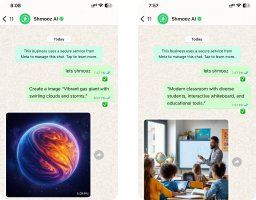
Start Creating art with Flux AI
Get access to the most advanced image generation and text generation models
Variants of Flux AI
FLUX.1 [pro]
The FLUX.1 [pro] variant is designed for professional use, offering top-of-the-line performance. It is best suited for users who need the highest quality outputs and are working on projects where detail and accuracy are paramount. This variant is ideal for professional artists, graphic designers, and studios looking for a reliable image generation solution.
FLUX.1 [dev]
The FLUX.1 [dev] variant is tailored for developers and non-commercial applications. It provides robust performance while being more accessible for development purposes. This version is perfect for those who are integrating image generation capabilities into their applications or experimenting with AI-driven art without the need for the highest possible quality.
FLUX.1 [schnell]
The FLUX.1 [schnell] variant is the fastest model available, optimized for local development and personal use. It offers a balance between speed and quality, making it suitable for quick iterations and personal projects. This variant is ideal for users who prioritize speed and efficiency in their creative processes.
Where can you use Flux AI
Flux AI can be used in a variety of creative and professional contexts, including but not limited to:
Marketing and Advertising
It allows marketers to produce visually appealing and consistent content for social media ads, email campaigns, and digital banners. By leveraging Flux AI, brands can craft unique logos, mascots, and illustrations that strengthen their identity. Additionally, Flux AI facilitates A/B testing by generating multiple variations of ad creatives, enabling marketers to identify the most effective visuals. Content creators can also use Flux AI to produce engaging visuals for blog posts, infographics, and video thumbnails, ultimately boosting user engagement and shareability.
Concept Art
For concept artists, Flux AI offers the ability to quickly visualize ideas, allowing for rapid iteration and refinement of concepts. The tool can add intricate details to sketches and rough drafts, enabling artists to focus on broader creative aspects. Flux AI can be used to create mood boards, which help set the tone and style for projects, facilitating better communication of the vision to team members and stakeholders. Additionally, artists can explore various styles and themes using Flux AI, discovering new artistic directions and inspirations.
Graphic Design
Graphic designers can benefit from Flux AI by generating custom images and designs that stand out from commonly used stock photos. The tool is capable of creating detailed patterns and textures for use in backgrounds, websites, and print materials. Designers can produce intricate illustrations for books, magazines, posters, and other printed media. Furthermore, Flux AI can help in designing user interface (UI) elements such as custom icons, buttons, and other components, enhancing the visual appeal of apps and websites.
App Development
App developers can integrate Flux AI's image generation capabilities into their applications to offer personalized and dynamic visuals to users. This enhances the overall user experience, making apps more engaging. Flux AI can automate content creation within apps, generating personalized avatars, backgrounds, and other graphic elements on-the-fly. Educational apps can also benefit from Flux AI by incorporating interactive and visually appealing learning materials. In game development, Flux AI can speed up the creation of assets such as character designs, environments, and props.
Education
In the educational sector, Flux AI serves as a valuable learning tool, enabling students to explore and develop their artistic skills by creating professional-quality work. Educators can use Flux AI to demonstrate artistic techniques and concepts through high-quality visuals, making lessons more engaging. Students can receive support in creating visuals for projects, presentations, and assignments, enhancing their creativity and presentation skills. Additionally, Flux AI can facilitate research in art, design, and AI, providing a powerful tool for experimentation and analysis.
How to Use Flux AI via Shmooz
The Shmooz AI interface is super easy to use. It has clear options and simple commands that make the image generation process easier. Whether you're new to this or have some experience, you'll find it easy to navigate and use the tool. Here are the ways that
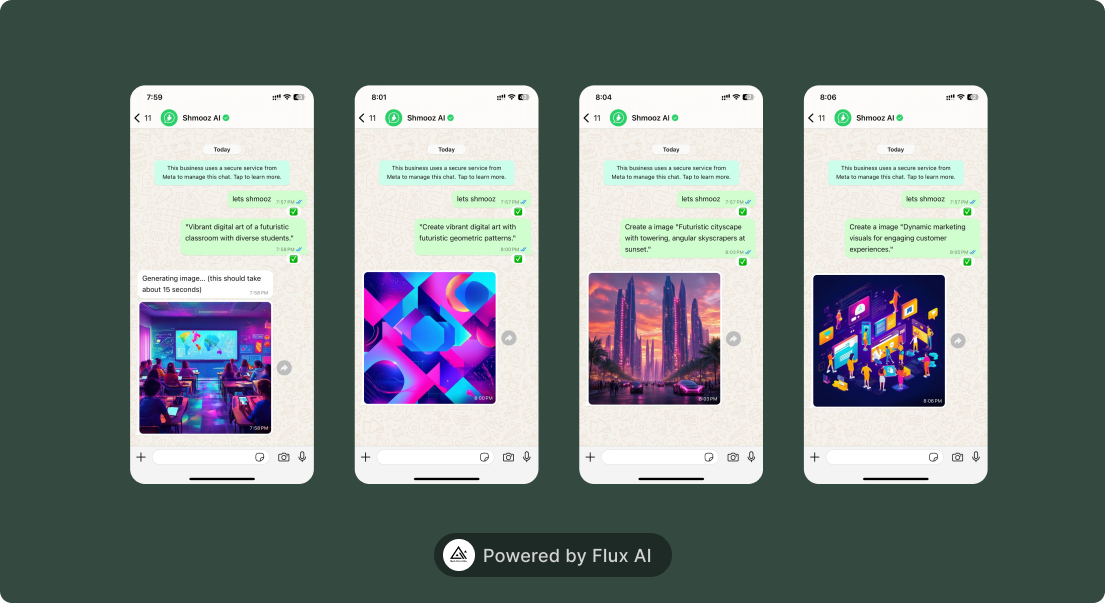
Open Shmooz AI
Visit the Shmooz AI website on your computer or mobile browser. Click on get started on WhatsApp, you will be redirected to the bot. Or get started here
Web
Visit the Shmooz AI website on your computer or mobile browser. Click on get started on the web, you will be redirected to the platform where you can create an account. Or get started here
Describe Your Image
Detailed Description
Type a comprehensive and detailed description of the image you want to generate. Include specific elements, colors, styles, and any other relevant details to help Flux AI understand your vision.
Submit Request
Send your description through WhatsApp or the web interface.
Enjoy Flux AI's Magic
Review Generated Image
Once Flux AI processes your request, review the generated image.
Save and Use
Save the custom artwork to your device for personal or professional use
Flux AI, combined with the accessibility of Shmooz AI, offers an unprecedented opportunity for creatives and professionals to explore new horizons in digital art and image generation. By leveraging this powerful technology, users can create stunning visuals with ease and efficiency. Get started today with Shmooz AI and unlock the full potential of Flux AI for your projects.
Start Creating art with Flux AI
Get access to the most advanced image generation and text generation models


ALL Systems Operational